In Microsoft Excel, everyone has heard of the VLOOKUP function. It is one of the most used functions within Excel and the function that most people want to learn. This is not surprising, because VLOOKUP is extremely useful and can be used in a wide variety of situations. It is capable of very complex data analysis, but can also be used very simply. In essence VLOOKUP does what it says on the tin. It looks things up. So why have Microsoft, effectively, created a replacement for it?
Although VLOOKUP is used by millions of Excel users every day, it is not without faults. In fact, many Excel users use alternative formulas because of this. VLOOKUP has three main issues:
Only Left to Right
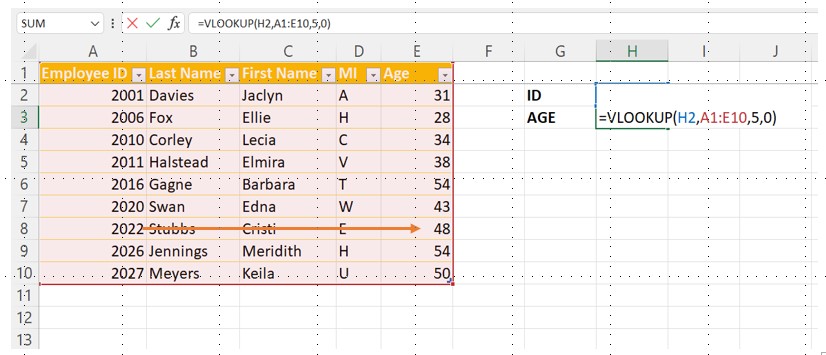
VLOOKUP only works from left to right. That is, it can only find a result value in a column to the left of the value that is being used as the look-up value. In the example below, if the Employee IDs were in a column right of the AGEs, it wouldn’t work.
The Column Number Issue
The column with the result required is designated by an index number. This means that if we want VLOOKUP to return data from the 2nd column of our data, we need to type in 2. The problem comes if another column is inserted into our data. Although our VLOOKUP will still have an index number of 2, the value we want to return may not be in the 2nd column anymore. At best, we won’t get the result we expect, at worst the VLOOKUP may stop working altogether.
VLOOKUP Defaults to an Approximate Match
LOOKUP functions in Excel can return an Exact match, meaning that they will only give a result if they can find precisely what we are looking for, or they can return an approximate match, meaning they will return the result nearest to the value we were searching for. Even though 99.9 % of the searches done with VLOOKUP are for an exact match, VLOOKUP default to an approximate match.
XLOOKUP fixes all these issues and more:
Left Lookup
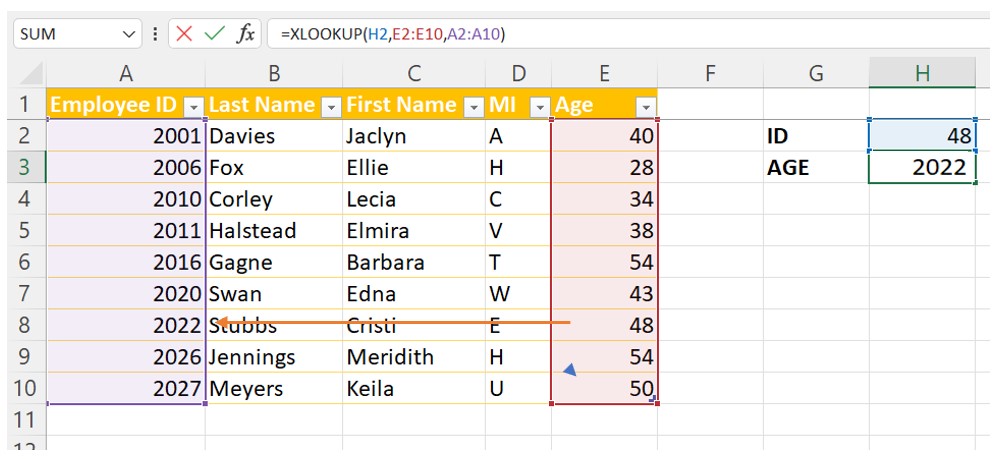
VLOOKUP will not allow a left lookup to be performed. Before XLOOKUP, this could be done by using a combination of INDEX and MATCH functions, but this was quite complicated. Now a left lookup can be completed simply by using the XLOOKUP function.
The XLOOKUP function looks up the age and returns the Employee ID.
Column Number
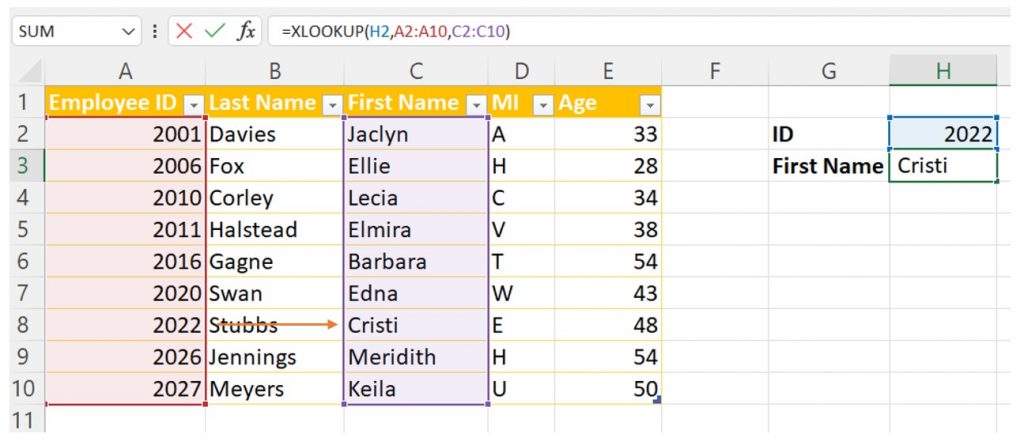
XLOOKUP allows the returning of a value from a particular column simply by selecting it or typing its range within the formula. A column number need not be specified and so the formula can’t be broken if columns or rows are inserted or deleted.
Exact Match
By default, the XLOOKUP function in Excel 365/2021 performs an exact match, unlike VLOOKUP.
XLOOKUP is only available in Office 2021 and Office 365. VLOOKUP will remain available in Excel, but there are many more benefits in using XLOOKUP, such as being able to return values from above and below, as well as from left and right. To find out more and to learn how to use this new function fully, why not try one of our Excel courses.
Public speaking and presenting are very important skills to master, especially in the workplace. Presentation skills are increasingly important in almost every role. In fact, in surveys of employers, good communication skills, both written and verbal, are seen as two of the top five most desirable attributes of employees.
Here are our guidelines to help you improve your presentation skills:
Confidence
Confidence is one of the most important traits to have whilst presenting. A confident speaker will have an authority that reassures their audience that they know what they are talking about. They are also much more likely to get their message across. However, saying that you should be confident and actually being confident are two different things. Luckily, there are methods that you can use to help to build your confidence:
Preparation: The three most important things that you should do for your presentation are; preparation, preparation and preparation. There is no substitute for taking the time to thoroughly plan, prepare and write your presentation. Preparation will not only make you confident about the material, it will enable to craft a coherent structure for your presentation that will most effectively get your message across. Remember, the more that you prepare, the better that you know your material and the more confident you will be.
Rehearse your Presentation: Once you have written the presentation, rehearsal allows you to see if it actually works. It lets you see if the presentation slides are effective and also if the overall timing is correct. The more you can rehearse the better, especially if you can rehearse in the place where you are going to be delivering the presentation. An added bonus is if you can practice the presentation in front of others. Even practising in front of friends or family can help to build your confidence.
Know your Audience: Being familiar with your audience can greatly help your confidence. If possible, analyse your audience prior to the presentation using research and surveys. If this isn’t possible, you can always take time to talk to and get to know your audience immediately prior to your delivery. This isn’t always easy, but getting to know and understand those that your are delivering to can definitely boost your confidence.
Concise and simple
Another key thing to remember is to keep things simple. We have all been in presentations where the presenter has overwhelmed us with too much information. Another of the benefits of all that rehearsal that we talked about earlier is that it will enable you to spot and remove any unnecessary information.
It almost goes without saying that you should avoid jargon, especially when you are talking to a group of people unfamiliar with your topic. Even when you are talking to peers and experts, keep technical terms to a minimum. If you must use them, spend time so that you are able explain them in simply.
“If you can’t explain it simply, you don’t understand it well enough.”
– Albert Einstein
Enthusiasm
Enthusiasm shows that you believe in your content. Enthusiasm is also infectious. If you care about your topic, your audience is liable to, too. It’s important, however, to convey that enthusiasm:
Change your Tone or Emphasis: It is vital that you vary the way you talk during the presentation. Speech is both verbal and vocal. How you say something is just as important as what you say. Emphasis for key words or concepts, pausing, speeding up or slowing down appropriately can all aid you greatly. This is somewhere else where rehearsal can help you greatly.
Speak Up: Vary the volume of your voice and the pitch. Again practice helps with this. You can even use emotion appropriately to convey your passion and enjoyment about the topic.
Research
It is almost redundant to say that you should have the best understanding possible for the topic you are discussing. If you are unsure, then this is likely to show. Knowing a subject well helps with your confidence too.
And don’t forget to prepare by researching potential questions that may come up. Not only will this help you to deal with these issues if they do occur, it is almost certain to improve your own understanding. Once again, you can ask colleagues or friends and family to mock-ask you possible questions to get practice answering them effectively.
Focus on your Audience Needs
Most importantly, you need to remember the prime reason you are doing the presentation in the first place and who it is for. The presentation is for your audience. It is not for you. When working and worrying about it, it is easy to forget this crucial point.
Always remember that it is what audience needs and wants to know, not what you can tell them, or want to tell them, that is of primary importance. And presentations are two way things, like all communication. As you deliver your presentation, always be focused on your audience’s reaction and respond appropriately to it.
Ditch your car and carry on past that bus stop because May is National Walking Month. Get fit by walking to work or school and perhaps even raise money by participating in a sponsored walking event.
You can help the British Heart Foundation by getting involved. Or maybe the Children’s Cancer and Leukemia Group, an organisation dedicated to helping detect cancer in children, which holds a number of fundraising events throughout the year to help fund their world-class research and the support they provide to the families involved.
If you wish to get involved in #WalkThisMay, here are some ways you can make a difference:
Organise a sponsored walking event at your school, work place, home or in the wider community. Raise money and get health benefits as you do so.
Take part in Walk to School Week commencing on the 21st May and use any money saved on fuel or parking as a donation to the CCLG. Even if you don’t go to school, you can you can still get involved by walking to work instead.
Have a friendly competition with your friends or colleagues and see who can walk the furthest, or the fastest, or can raise the most money within the month!
Do the #try20Challenge which encourages you to walk at least 20 minutes every day for the whole month. This can be a sponsored event to which friends and family can donate.
Sign up for a walking event later on in the year and use May as the perfect time to kick start your training
Five Benefits to Walking over Driving!
It’s free: Walking is both good for you both physically and financially. There is no cost in using your legs. Currently the cost of running a car is increasing incredibly because of the exponential rise in the price of fuel.
Less Pollution: Unlike cars, walking doesn’t cause pollution, whether that be carbon dioxide or sound pollution. As we all want to minimise our impact on the environment, now may be the perfect time to ditch the car for those shorter journeys.
Health benefits: Walking as a form of exercise has many health benefits. It strengthens the heart and lungs and makes us less susceptible to pulmonary disease.
It makes you feel better: Studies suggest that walking improves mental health, and time outdoors getting fresh air helps clear the mind and relieve stress.
Parking: There is none! Walking into a town means you don’t have to drive around for hours looking for an affordable place to park. It makes the whole trip less stressful and there’ll be no more reversing into tight spaces.
Remember while this month is about raising money for charity, the changes you make can be kept for the rest of the year. Or even longer.
Easter is just around the corner, and traditions and celebrations for it are different around the world. However you celebrate it, here are our top 5 ways to make Easter fun this year, for all ages!
Easter Eggschange
It’s common to give gifts in lots of different holidays, but Easter is one where gift-giving isn’t something that is usually done. This is why we think participating in an ‘Easter Eggschange’ is a great idea.
It is just like a Secret Santa, but at Easter. A group of people anonymously buy each other gifts and exchange them. You can even create a theme, for example the gift has to somehow relate to Easter and see where people go with it.
Egg Hunt
Egg hunts are common around the UK and are easy to organise. Just buy a few hollow eggs, put little gifts or treats inside and hide them around a specific location such as the house or garden.
Then set friends or family off, looking around for them and winning the treats. You can even have a grand prize for the person who collects the most eggs.
Easter Games
There are many egg themed games you can play. Our favourites include:
Egg and Spoon Race: Simple and classic. All competitors place an egg on a spoon and then race each other across a specified distance. You can make it more sophisticated, by adding rules such as, if an egg falls and cracks, then the racer is eliminated from the race. Or why not make it an egg and spoon obstacle race to make it more of a challenge.
Egg Toss: Simple. Throw an egg as far as you can, without it breaking. Furthest distance tossed with the egg still un-cracked wins.
Easter Piñata: Fill up an Easter themed Piñata with mini chocolate eggs, sweets and treats. Everyone takes turns to hit it and then dive in and scoop up as many treats as possible.
Chocolate for Breakfast
Have you ever eaten chocolate for breakfast? We here at Infero can neither confirm or deny that we have ever guzzled Cadburys instead of cereal. What we can say is that while it’s not something that is a good idea to do everyday, maybe it is ok, as a special treat for Easter. After all, Easter eggs have been on sale at ridiculously low prices since January and if you find yourself with one too many come the day itself, then just this once, why not?
We won’t tell if you don’t.
Paint and Colour an egg
A fun tradition among children at school is to paint and/or colour eggs as the Easter holidays approach, but who says kids have to have all the fun.
Why not continue this tradition into adulthood and create a eggs-raordinary work of art. Create a few eggs in this way and you can even use these as part of your egg hunt, so the treats come inside a beautifully decorated egg. Or use a giant egg for eggs-tra eggs-travagance.
Good news for music lovers everywhere. It’s time to celebrate an instrument that is essential for most modern genres; the guitar. April is International Guitar month, which started in 1987 and has grown in scale since then, and now has an increasing emphasis on guitar instruction. So if you don’t know how to play the guitar, but have always wanted to, it’s the perfect excuse to learn!
A Brief History
Today, the guitar is one of the most popular instruments because it is versatile, portable and affordable. It is relatively easy to learn and is the basis of most popular rock and pop music, making it one of the most visible instruments to music fans of all kinds.
Antecedents of the guitar can be found from over three thousand years ago and the term previously referred to instruments used across Europe, beginning in the 12th century and, later, in the Americas.
The form and structure of the modern guitar was established circa 1850 in Spain by different Spanish makers with the most important, possibly, being Antonio Torres Jurado who increased the size of the guitar body, altered its proportions, and invented the breakthrough fan-braced pattern. This improved the volume, tone, and projection of the instrument, and it has remained essentially unchanged since.
The earliest first-fully functioning solid-body electric guitar to be manufactured and sold was released in 1932 and the development of this instrument, so beloved in popular music, continued in the forties, until we had the instrument that we know today.
How to Celebrate
Buy a Guitar: International Guitar Month is the perfect opportunity to start learning the instrument. There may be discounts from retailers in April, so keep a look out for these.
Learn How to Play: Find a teacher, either a friend or a professional, to help you get to grips with the basics, or enrol in a guitar class. The beauty of a guitar as an instrument, however, is that it is relatively easy to grasp the basics and many guitar players are self-taught. So why not teach yourself.
Attend a Music Festival/Concert: If listening is more your thing, go see live artists and appreciate the lyricism and magic that a guitar can create in the hands of a virtuoso. The guitar is recognized as a primary instrument in nearly every popular music genre, including blues, bluegrass, country, flamenco, folk, jazz, jota, mariachi, metal, punk, reggae, rock, soul, and pop. There is something for everyone.
Delve Deeper Into Guitar History, Schedule your OWN concert and perhaps Listen To More Guitar Music, using your favourite streaming service, in the comfort of your own home.
Write a Song: Pen a love song, a protest song, a song about the times we live in, an instrumental, a prog-rock epic, or a gentle acoustic ballad – it doesn’t matter.
Fun Guitar facts:
The world’s biggest functioning guitar is 13 meters long, each string plays the correct note.
On the other hand, the shortest Guitar is only 10 macrons, this one is less playable.
The most expensive guitar ever sold for £2.8 Million, raising funds for charity after a tsunami in India.
James Rowling, in 2020, managed to balance a guitar on his chin for 1 hour and 7 seconds, setting a new world record.
Hope is often seen as one of the most important emotions in life in life. Defined as an optimistic state of mind based on an expectation of positive outcomes, hope is something that we all have to a greater or lesser extent.
hope/
1.a feeling of expectation and desire for a particular thing to happen.
Oxford Languages
Hope is portrayed as a great motivator in films, TV shows and literature, and psychological studies have shown that hope can, indeed, be of great benefit to us, but only when the thing we hope for is based on a realistic sense of optimism, not on a naïve “false hope”.
In the USA, April is the National Month of Hope and celebrates the power of this emotion. As the days get lighter and warmer and spring really arrives, hope seems to come a little easier.
History:
The National Month of Hope is the result of the work of the not-for-profit organisation, Mothers In Crisis, Inc. Beginning as a support group for women, the organisation expanded into community-based prevention and intervention for drug rehabilitation. Mothers in Crisis was founded by Rosalind Tompkins in 1991, herself a recovered addict.
Mothers In Crisis, Inc. supports women and families. It’s hope campaign encourages the sharing of stories of hope to help families ripped apart by addiction and this, in turn, led to the recognition of April as the month of hope in 2018.
How to Celebrate:
Here a few ways you can help spread hope and kindness around your community:
Volunteer by reading to children in schools or a library.
Experience meaningful and healthy communication with loved ones, family, friends, co-workers, and colleagues.
Giving of time, food, and money to help families in need.
Post on social media words of hope, you never know who needs those extra words of encouragement.
Sharing your story of overcoming with those who are going through hard times, can inspire them or show that times can get better.
Lending a helping hand to those in need, can be as simple as carrying someone’s shopping.
Cleaning up areas where there is litter such as parks, beaches and any green spaces.
Spend a day with the homeless whether on the streets or at a homeless shelter or food bank.
There is no doubt that hope is an important thing in people’s lives and the psychologist Charles R. Snyder has argued that hope should be viewed as a cognitive skill that demonstrates an individual’s ability to maintain drive and motivation in the pursuit of a particular goal.
Hope is the thing with feathers that perches in the soul and sings the tune without the words and never stops at all.
— Emily Dickinson
There have even been some studies that have shown that hope can play an important part in the recovery process from illness; it has strong psychological benefits for patients, helping them to cope more effectively with their disease.
Hope is the thing with feathers, as Emily Dickinson said, and a little bit of hope is good for us all.
Across the UK it is estimated that 44% of households own some sort of pet, whether that be a dog, cat or something else. Unfortunately, it’s also estimated that around 1 million reports of animal abuse are recorded a year. That number should be zero.
Recent legislation has much improved protection for animals, but there is still much to be done.
What’s Been Done So Far?
The Animal Welfare Act 2006 is the latest animal welfare legislation in England and Wales. It superseded and consolidated more than 20 other pieces of legislation, such as the Protection of Animals Act 1934 and the Abandonment of Animals Act 1960. Prior to this Act, animal welfare law was largely reactive and action could only be taken once an animal had suffered unnecessarily.
The 2006 Act introduced the important concept of a duty of care that animal owners have, whether those animals are pets or commercial animals, to ensure they care for their animals properly. In practical terms this means that an owner must ensure that an animal has:
A suitable environment
A suitable diet
Is able to exhibit normal behaviour patterns
Is housed with, or apart, from other animals, as the particular animal’s needs dictate.
Is protected from pain, suffering, injury and disease.
The penalties for breaking this act originally included being banned from owning pets in the future, facing a fine or a sentence of a maximum of 6 months in prison. Many critics of the law argued these penalties were not enough and, after campaigning by organisations such as the RSPCA, the law had was amended in 2021 so that those guilty of the worse offences could face an unlimited fine or a maximum of 5 years imprisonment.
Other regulations have been put onto the stature books since the Animal Welfare Act of 2006, including the Welfare of Farmed Animals (England) Regulations 2007 which set minimum welfare standards for farm animals generally, but many would argue that this is still not enough.
There’s More to Be Done
Animal rights in the UK have advanced in recent years, but with that estimated one million reports of animal abuse a year, Prevention of Cruelty to Animals Month is an opportunity to educate ourselves and others as to what we can do to help our furry companions.
Fox Hunting
Whilst Fox hunting is illegal in England, Scotland and Wales, it isn’t illegal in Northern Ireland meaning many foxes are still ripped apart by dogs as a sport in this part of the UK. In fact it is estimated that around 400,000 foxes are killed a year across the UK as a whole, as shooting foxes as a pest is still legal.
Despite the ban on hunting in England, Scotland and Wales, there has been an increase in membership of the Masters of Foxhounds Association (MFHA) which currently represents 176 active foxhound packs in England and Wales and 10 in Scotland. Illegal hunt still continue and there are many loopholes in the law that allow the killing of foxes by hunting packs. The legislation needs to be strengthened and properly enforced to stop this barbaric an cruel ‘sport’.
Breeding
Whilst there is nothing inherently wrong with breeding pets such as dogs, the over breeding of pedigree animals can cause long term health issues and the main priority should be animals health and wellbeing rather than achieving a perfect look.
Pugs, for example, have for years been bred to achieve flatter features, but as a consequence many individuals of the breed have issues with breathing. This affects their ability to exercise, causing knock-on effects to their health as a whole.
What Can We do?
Participate in Prevention to Animal Cruelty Month by:
Signing petitions, whether it be to create further protections for animals or to bring in new legisalation where the law is still lacking. Write to your MP. If enough of us act, it could make a difference.
Consider adopting your next pet from a shelter rather than a breeder. Perhaps you could take in an animal that has had bad treatment previously and help change an animal’s life by letting them live in a loving home.
If you are going to get a pet from a breeder, try and find an one that is ethical and that prioritises the health of animals over making money. The RSPCA have a list of guidelines to help you find an ethical breeder.
If you can’t adopt a new pet, perhaps you could donate some time or money to a local animal shelter, to help with to give unfortunate animals a second chance. Every little will help.
We can also make small changes in the way we shop, by buying free range eggs, milk and other dairy products, and by trying to ensure that the food we buy is ethically sourced. Giving producers a financial incentive to treat animals ethically can only be a win-win.
Animals provide us with so much love, companionship and loyalty and make the world such a better place. They deserve a little bit of effort from us to help make their lives better.
In some parts of the world, March is optimism month, during which the idea is promoted that we can actively change the way we think and start to view things more optimistically. We know that some people are naturally more optimistic than others, but whoever we are and whether we are inherently positive or not, we can work to train ourselves to create a lifelong habit of optimism, for a happier, healthier life.
How Thinking Optimistically Can Help You.
People will often assume that those with a more positive outlook on life are that way due to the fact they may have had an easy life, or that they’ve never had something major happen to them that shook their worldview, but this is not entirely the case.
Research suggests that optimistic people are happier because they actually gain happiness from their optimistic outlook. This can have health benefits as a happy life can lead to a longer and healthier life, especially mentally. So how do we ‘train’ ourselves to be more optimistic? There are a number of ways:
How to help optimise your optimism.
Coincidence Journal:
Do you remember the last time you experienced good fortune, or a coincidence that benefited you? Perhaps you moved something valuable off of a shelf moments before that same shelf fell of the wall. We all experience these happy coincidences on a regular basis, but we can fail to notice them, as we may be too stressed or busy.
It’s important to take note of these, so create a journal that you can add to every night (or when you’re free) and you’ll soon start to appreciate how much is actually going your way. Revisiting this journal will help you focus on the positive and gain a new perspective.
Gratitude Journal:
Creating a gratitude journal is another way to focus on the positivity in your life.
Challenge yourself to write three things that you’re grateful for at the end of each day. If you can, try to make what you write each day different, to help highlight as many positive events in your life as possible. It will help you promote a more optimistic outlook.
The best thing about keeping a journal is that if you’re feeling down or stressed, it can be a great reminder of all you have to be thankful for.
Vision Board:
When you set yourself goals, it’s important to visualise how you can achieve them. Creating a vision board can help you do this and see your aims clearly.
The first step is to set your goal (or goals) and place them at the top of your board. Below this, draw a ladder, with each rung being a step towards achieving your goal. Break down your thought processes and be realistic; it’s important that you maintain the right difficulty level for each step, or you may lose motivation. As you move down the steps, you can mark the fact that you have completed them in whatever way you wish and get a visual sense of your progress. Your optimism will hopefully increase as you see yourself get closer to the overall goal.
In case you feel that you could end up being too optimistic and this might actually end up being harmful rather than helpful, this is actually quite unlikely. Studies have shown that most people are consistently wrong in being too optimistic. On average, people expect good things to happen and bad things to not happen, and these optimistic beliefs are more positive than can be justified by reality.
But for the most part, this over-optimism does no harm. In fact, we may have evolved this way, as it give us a survival advantage. Being optimistic is extremely motivating and will make us try harder (creating a self-fulfilling prophecy). It also helps us to avoid stress.
Spring is nearly here and, for us at Infero, it can’t come soon enough. It’s the season of rebirth and rejuvenation, when animals emerge from hibernation and nature starts to regrow. Here are our top picks of why spring is the BEST season.
Longer days
The further from December’s midwinter solstice that we get, the longer the days become. Thankfully it is no longer pitch black outside by 4:30 pm. By the end of March, sunset won’t happen until almost 6:30 in the evening. Then, daylight saving time will come to an end and our clocks will spring forward an hour, giving us late evenings to enjoy for the whole of summer. Taking full advantage of all this natural light benefits our mood, as sunlight directly affects how much serotonin our brains release, a hormone that makes us feel both happier and healthier!
Wildlife
Spring sees the return of wildlife to our parks and gardens. As well as the return of hedgehogs from hibernation, the UK sees the return of many migratory birds, with birdwatchers recording the the first arrival of the first Swallow or Cuckoo of the year. And, whilst butterflies can be seen all year ’round in the UK, this is only in certain habitats. It is in spring that we will begin to see these wonderful and unique creatures once more grace our gardens; from late March and April onwards. The species most likely to be found near our homes include peacock, red admiral, small white and painted lady butterflies. All this can have an extremely positive effect on our own well-being. In fact, a UK study in 2017 directly linked the number of birds people could see in their neighbourhoods to their reported mental state. The little things really can cheer us up.
Warmer
We all know that the UK doesn’t get the hottest weather, except, perhaps, for two random weeks, somewhere between March and November, when the temperature climbs to the mid thirties and we all complain that it is ‘too hot’. Spring does, however mark temperatures rising to slightly more bearable levels than those of the depths of winter. This means we can go outside, enjoy the fresh air and take advantage of those longer days. March winds and April showers may mean that spring is breezier and wetter than the summer to follow, but it still feels great to be outside. And once out and about, feel free to channel your inner Pepper Pig and go jumping in those muddy puddles.
Nature – The Great Outdoors
For those who love gardening, it’s time for you to return to your favourite hobby. Spend some time planting seeds, pruning your shrubs and vines, adding colour in your lawn, by using plants such as pansies, clean and prep your garden and rejuvenate your water features. And if gardening’s not your thing, then wander a little further from home to marvel at the splendour of nature. And there is a lot to see; consider the 15 National Parks in the UK. In England 10 National Parks cover 9.3% of the land area, in Wales 3 National Parks cover 19.9.% of the land area, and in Scotland 2 National Parks cover 7.2% of the land area. You can learn more about these spectacular national treasures in our previous post here.
So whatever you do, get out and enjoy spring. Like the song says:
Throughout history the achievements of women have been overlooked and under-represented, and this is no less true in the UK. March is Women’s History month, when we look back and celebrate the contributions of women and how they helped develop our nation.
Until relatively recently women did not enjoy the same rights under the law as men; for example, they only gained the vote in 1918. Even then, they only had the right to vote if they owned a house. Women didn’t gain real equality, in voting terms, until 1928.
It was groups such as the suffragettes, using both peaceful and more extreme forms of protest, with the aim of causing as much societal disorder as possible, that eventually helped force the then government to give women the vote. Their struggle wasn’t without sacrifice. Emily Davison, a key figure of the suffragette movement was killed during one protest, after throwing herself In front of the king’s horse during a race.
For the vast majority of recorded history, women’s voices have been ignored and their contributions hidden, or perhaps worse still, the credit for them has been stolen by others, invariably men. Women’s history month focuses on the achievements of those in the past who were passed by at the time and celebrates the significance of what these women did, for both equality between the sexes and for their societal contributions.
Here are some of the Women that helped to shape the UK and the world as we know it:
Florence Nightingale
Although known in popular mythology as “The Lady with the Lamp”, it is unclear whether her achievements in the Crimean War were exaggerated by the media at the time. This doesn’t really matter, however, as Florence Nightingale was, by any measure, one of the most remarkable people of her time, male or female, and is agreed to be the founder of modern nursing.
After rejecting the expected role for a woman of her status to become a wife and mother. Nightingale worked hard to educate herself in the art and science of nursing. During the Crimean War she served as a manager and trainer of nurses , organising care for wounded soldiers at Constantinople. Giving nursing a favourable reputation and becoming an icon of Victorian culture, she later established her nursing school at St Thomas’ Hospital in London, the first secular nursing school in the world. Her achievements in the profession are such that in some countries the ‘Nightingale Pledge’ is taken by new nurses, and the Florence Nightingale Medal is the highest international distinction a nurse can achieve.
What is much less well-known about her is that Nursing is only one part of a remarkable career. She was a social reformer whose reforms included improving healthcare for all sections of British society, and someone who expanded the acceptable forms of female participation in the workforce. A pioneer in statistics she developed a form of the pie chart now known as the polar area diagram. In addition to all of this Nightingale was a prolific writer, publishing a large number of books and tracts, many concerned with spreading of medical knowledge and written in simple English.
Mary Seacole
Mary Seacole is the other famous nurse of the Crimean war. After hearing about the poor treatment of soldiers in Crimea, she offered herself to assist with nursing the wounded, and applied to the War Office to be included among the nursing contingent, but was refused. She later attributed this refusal to prejudice, but she travelled to Crimea independently anyway and set up her “British Hotel” behind the lines. She described the hotel as “a mess-table and comfortable quarters for sick and convalescent officers”.
Displaying “compassion, skills and bravery while nursing soldiers during the Crimean War” and relying on her skill and experience as a healer and a doctress from Jamaica, many have argued that she was the first nurse-practitioner. Returning to Britain after the war, she got into increasing financial trouble and was declared bankrupt. The British press highlighted her plight and a Fund was set up to help her and there was even a festival held in her honour. After her death, she was largely forgotten for almost a century, but was posthumously awarded the Jamaican Order of Merit in 1991 and in 2004 was voted the greatest black Briton, with a statue of her being erected at St Thomas’s hospital, London in 2016.
Marie Curie
Mare Curie was a Polish Born Chemist who had moved to Paris for a chance to study at university. She worked closely with uranium, a new and highly radioactive substance but, during her studies, noticed that some parts of the uranium were more radioactive than others, and realised that the readings couldn’t be that of the uranium alone. Despite being doubted by her peers, she continued researching and discovered a new element, polonium. She went on to find yet another element – radium.
Marie Curie’s discoveries paved the way for much modern medicine and the treatment of cancer through radiotherapy, as it is used today.
Ada Lovelace
Many consider Lovelace to be the first computer programmer, long before what we would now call computer even existed. After working with Charles Babbage, who proposed an Analytical Engine (a programmable, general-purpose computer) she recognised that the machine might have applications beyond pure calculation, and published the first algorithm (programme) intended to be carried out by such a machine.
The Analytical Engine was never finished, so her work couldn’t be put to the test during her life-time, but her contributions to Mathematics and Computing cannot be underestimated and she’s now remembered through the programming language dubbed “Ada”. A hundred years ahead of her time, Ada was remarkable also because the vision she had of computers going beyond mere mathematics. She asked questions about the Analytical Engine itself and how individuals and society relate to technology.
Amelia Earhart
Amelia Earhart was an American-born pilot who defied gender roles to pursue her passion in aviation. She set many milestones during her life, such as being the first woman to fly solo across the Atlantic (second person ever) as well as the being the first person to fly from Hawaii to the mainland USA. She received a ‘Distinguished Flying Cross’ for her trans-Atlantic flight. After placing third in the All Women’s Air Derby, she helped found the Ninety-Nines, an international organisation to help women into aviation, which is still around today and helps women from 44 different countries.
Attempting to navigate the globe she was only 7000 miles away from completing her goal when she and her navigator Fred Noonan disappeared after losing contact with the US Coast Guard. Investigations and significant public interest in their disappearance still continue over 80 years later.
These women and many more like them around the globe have helped push boundaries and change the world for the better. We can celebrate how far we have come in terms of equality and look back on those that paved the way.