Outlook is a great tool for not just sending and receiving emails, but for also incorporating your day-to-day happenings in the office. Calendar tools can help with setting meetings, appointments and plan your day.
To set up a meeting in Outlook, go to the Home tab on the Ribbon, select New Items and then select Meeting.

Once you do that, you will get the New Meeting Dialogue Box.
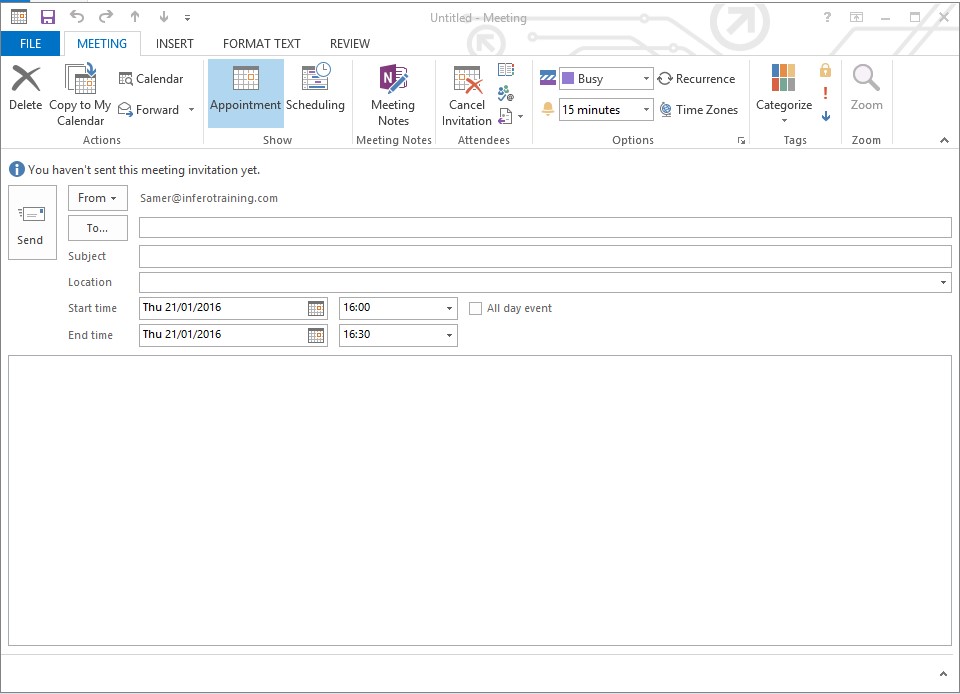
It is easy to invite people to a meeting by using the ‘To‘ box and adding a subject in the ‘Subject Box’. You can also schedule a time and date by adding them into the ‘Start/End Time’ box as shown in the picture above. It is also possible to schedule a meeting for the entire day, simple click the ‘All Day Event‘ button.
Fancy learning more about how Outlook can benefit your business? Then have a look at our Outlook courses.
Let us know what you think and message us on Facebook and Twitter